Shells
“I collect information to use in my own way.” — Major Kusanagi, Ghost in the Shell (1995) script
Last week we generated shells; this week we go looking for the ones already sitting in archives, waiting to be described. Kusanagi collects information to use in her own way; so does every archive — and so, in its own opaque way, does the model we’re about to turn loose on one. The AI Con’s chapter on doomers and boosters and Noble’s chapter on searching are both, in their way, about who gets to decide what an image “shows” and whose interests that framing serves — worth keeping close as you ask an LLM to describe, caption, and visualize a set of images it has never seen before and has no stake in getting right.
For a way into The AI Con’s distinction between doomers and boosters, I recommend Daniel Roher’s documentary The AI Doc: Or How I Became an Apocaloptimist (2026), now streaming on Netflix. It puts AI executives and researchers who predict catastrophe side by side with those promising salvation, and it’s worth watching with Bender and Hanna’s argument that both camps share the same hype in mind. (Recommended and optional.)
Tutorial: Archival Images
This week, we’re going to think about the challenges of translation from one medium to another, and explore how LLMs process or “see” complex images. For this exercise, you’ll be working in a project in either Claude or ChatGPT’s Work mode, just as we did with the distant read in Week Four. For this project, I recommend working with images you find interesting that are related to your work in some way — assemble these as a collection of at least 10 images or imagetexts that speaks to a theme or subject that has significant complexity. The Internet Archive is my recommended source: its image collections, scanned books, magazines, and comics give you plenty of material to choose from, and it’s easy to download a set as individual files. The Library of Congress is another good option if you need ideas. Consider the work discussed in this week’s reading on Refik Anadol — his Archive Dreaming trains a model on roughly 1.7 million archival documents and lets visitors move through the resulting associations as a physical, architectural space — and ask how generative AI might change your approach to a larger visual cultural dataset. While we won’t be working at that scale for this exercise, consider the broader projects that might build on these methods.
Louis Jebb’s Art Newspaper interview with Anadol is useful here for demystifying the “art” side of this process: Anadol is unusually candid about the pipeline of data collection, model training, and human curatorial choice that sits behind a piece that otherwise reads as pure spectacle. If you want a sharper critical counterweight, this week’s optional reading — Gabriel Menotti’s “The model is the museum,” AI & Society (2025) — argues that projects like this can also be read as a kind of expropriation of cultural heritage, training on collections whose original communities have no say in how their material gets remixed. (Recommended and optional; PDF in Webcourses.)
Image to Text Translation
Iterate through a series of prompts to build from analyzing single images to a larger set. Start by setting up a project: in Claude, create a new project and upload your images to it; in ChatGPT, create a project and select Work mode. Upload at least 10 images or imagetexts to the project for best results (just select multiple files in a folder) — the model needs enough of a set to see patterns. Work from simpler images (with or without text) to more complex and potentially confusing images. These can be photographs or, as with our readings, not-photographs of any kind — a set of screenshots, archival scans, hand-written documents, etc.
A note if you’re using Claude: Cowork no longer exists as a separate mode. Its capacities are now integrated into the main Claude chat, so work from a chat inside your project. Make sure to ask for an artifact as your output whenever you want a visualization or interface, so that you get something you can open, explore, and share with a link.
Here’s a few examples of questions to ask about single sets and images to prompt different types of translation:
- Describe what you see in this image. Follow up about material elements and specific details in the image. If there’s an art or craft depicted, ask about the process or construction.
- Write alt-text for this image. Keep in mind accessibility standards. To work more broadly, ask it to extrapolate and provide introductory descriptive text for the set of images.
- Pull out and describe key features. Start with a single image, and work up to a larger set. See if it can assist in drawing out or recognizing patterns of details, composition, etc. that might be of interest.
- Visualize the set. Ask it to use the file names of the images, and put them into a meaningful relationship: you could ask for an artifact positioning them in relationship to one another based on key characteristics. Try building similar artifacts or asking for something more complex.
For my demonstration, I used a sample set of generative artwork from the Internet Archive: “AI ART GROUP #86” by Dreagus Productions, part of the archive’s Generative Art Archive collection and shared under a CC BY-SA 4.0 license. I uploaded the images to a project and asked Claude to build an interactive artifact for exploring them. Here’s the prompt I used:
I’ve collected a sample set of generative artwork. Build a interactive artifact for exploring these images, with alt text offering significant description of each, a color explorer for looking at the palettes across the set, a stylistic grouping breakdown with tags for looking through images and noting similarities and differences
The result is Spires & Moons: a gallery of sixteen images with long-form alt text, a palette map and color search, style groups with a tag matrix, and a side-by-side compare view. I ran the same prompt with ChatGPT’s GPT-6 Sol, which built the Generative Artwork Atlas: a browsable collection with searchable descriptions, a color explorer, style and tag views, and a compare-and-notes view.
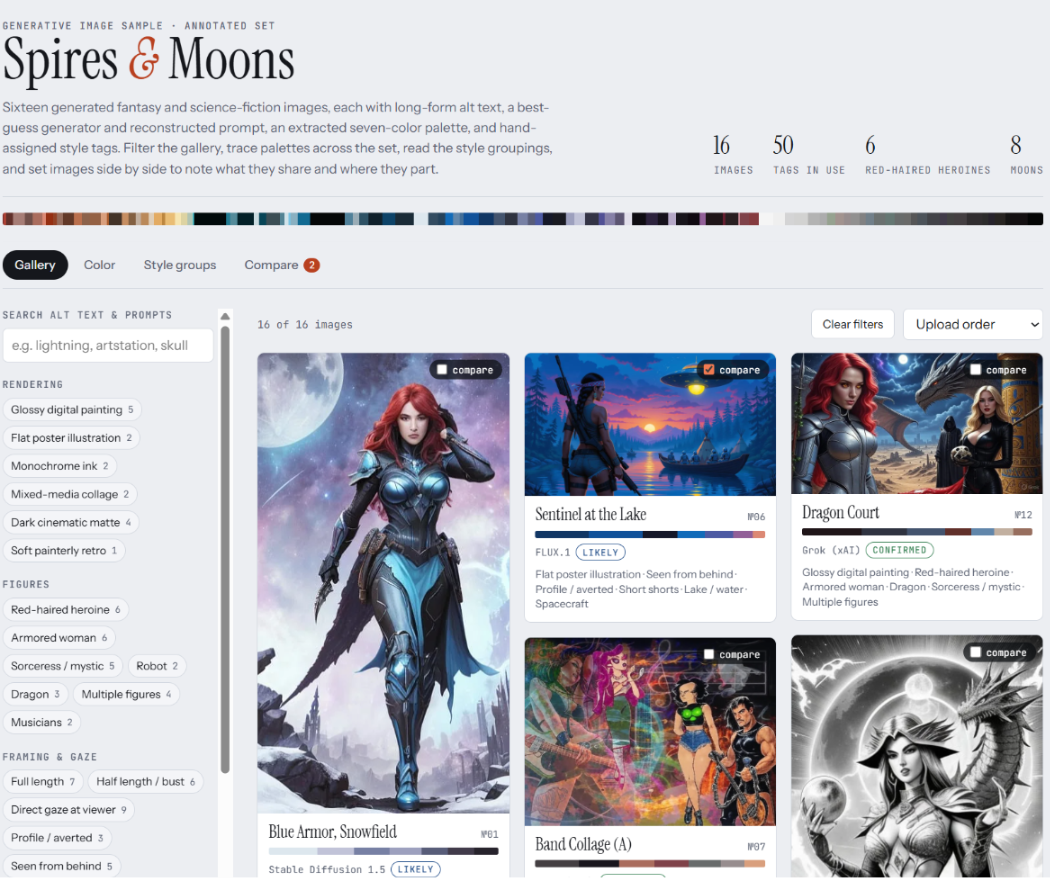 Figure 1. The Spires & Moons artifact, generated with Claude from the prompt above. Images: “AI ART GROUP #86,” Dreagus Productions, Internet Archive, CC BY-SA 4.0.
For your own set, the Internet Archive’s image collections are a good starting point: browse a collection that connects to your interests, download at least 10 images, and adapt the prompt to your material.
As you work, think about how this might change your approach to text-to-image prompting (like we did last week). Consider what other uses this might have for investigating material culture, and where the weaknesses are in the translations.
Discussion
For full credit, share both screenshots of your process (the prompts you used and the model’s responses along the way, as well as highlights, particularly visualizations and other analysis) and a link to the artifact or generated visualization itself in the discussion. With your images in a project, you should be able to work across a large number of them at once, so try to push the limits and see what type of results you can get working towards analysis at scale. I recommend using the newest models: Claude Opus 5.5 (model card) or ChatGPT’s GPT-6 Sol or GPT-6 Luna (model cards), all released on September 22. Simon Willison’s post “Claude Opus 5.5, GPT-6 Sol, GPT-6 Luna, and a new price war” breaks down the differences between them, and it’s on this week’s reading list. While it will be easier to analyze the accuracy of the results with images you are familiar with, consider branching out as you experiment to see how useful you find the translations provided.
Finally, a gesture back at the epigraph: a machine-written caption is a model collecting an archive’s information to use in its own way. Whose reading is that description — and does it matter, if it becomes the way most future viewers encounter the artifact?
Don’t forget to reply twice to peers (1 point / reply) for full credit!